Plugin Parameters
Plugins in 1Gateway share a common set of configuration parameters.
This document groups all parameters into these sections:
- General: Common fields across all plugins.
- Process: Controls how data is handled before/after processing.
- Queue: Specific to Outbound plugins for managing delivery.
- Message: Specific to Inbound plugins for describing incoming data.
- Poller: Extra configuration for inbound polling.
General Configuration (All plugins)
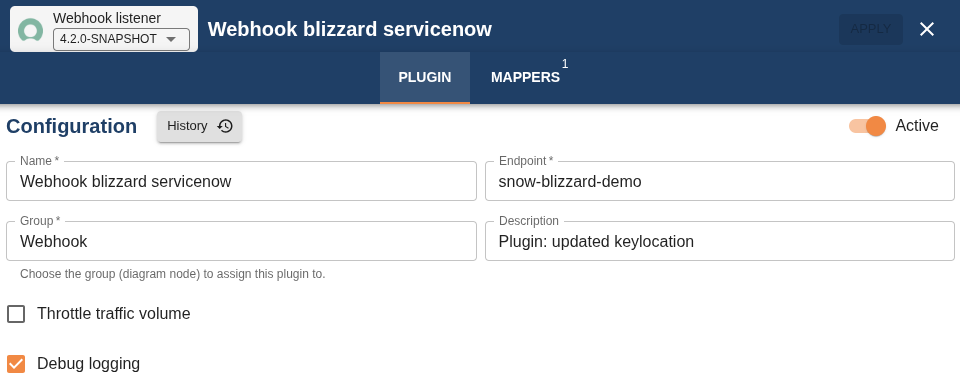
| Plugin Type | Field | Supported Values | Description |
|---|---|---|---|
| All | Name | Any string | Plugin name |
| All | Endpoint | Any string | Alias of the connected external product |
| All | Group | Any string | Group label for organizing plugins |
| All | Description | Any string | Description of the current plugin configuration |
| All | History | Button | Restore a previous plugin configuration version |
| All | Throttle traffic volume | True/False | Adjust ingestion/sending rate when flow control requests are received |
| All | Debug logging | True/False | Show debug information in the log file |
Process Configuration


| Plugin Type | Field | Supported Values | Description |
|---|---|---|---|
| Outbound | Process 1Gateway messages | True/False | If false, prevents forwarding messages (useful for testing) |
| Outbound | Filter expression | Groovy expression | Apply filters to exclude messages before mapping |
| Inbound | Use override script | True/False | Run custom script for specialized integrations |
| Inbound | Delay between REST calls | Integer | Delay in seconds between REST API calls |
Queue Configuration (Outbound only)
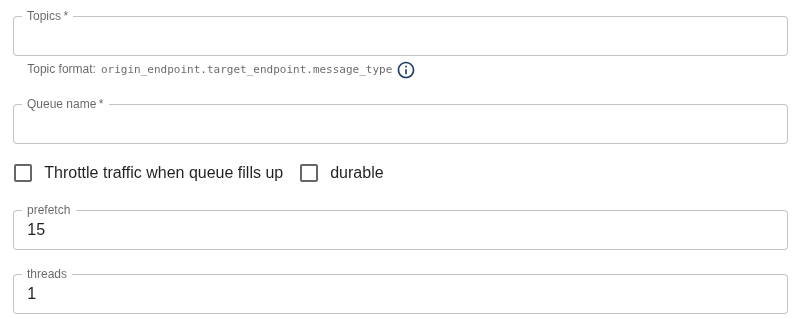
| Plugin Type | Field | Supported Values | Description |
|---|---|---|---|
| Outbound | Topics | Any string | RabbitMQ queue topics to which the sender is subscribed. Multiple topics can be listed, separated by commas. Format: source_endpoint.destination_endpoint.message_type |
| Outbound | Queue name | Any string | Name of the processing queue assigned to this plugin. |
| Outbound | Throttle traffic when queue fills up | true / false | If enabled, the system limits or reduces message traffic when the queue reaches capacity. This prevents saturation, performance issues, or message loss. |
| Outbound | Durable | true / false | Marks queues/messages as persistent in RabbitMQ. Durable queues survive server restarts, ensuring message integrity and availability. |
| Outbound | Prefetch | Integer | Number of unacknowledged messages a worker can receive before processing them. Controls consumer load and flow. |
| Outbound | Threads | Integer | Number of parallel processing threads available to handle messages simultaneously. Improves concurrency and throughput. |
Message Configuration (Inbound only)
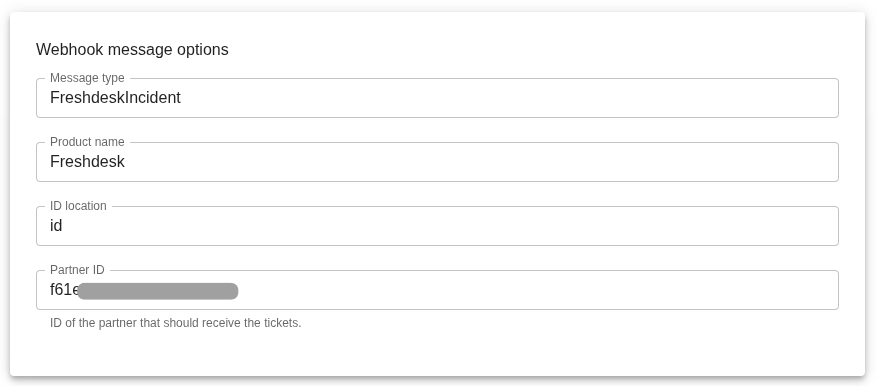
| Plugin Type | Field | Supported Values | Description |
|---|---|---|---|
| Inbound | Message type | Any string | Type of message retrieved from the source system |
| Inbound | Product name | Any string | Product identifier (e.g., Freshdesk) |
| Inbound | ID location | Any string | Location of the message or ticket ID (e.g., /ticket/id) |
| Inbound | Partner ID | True/False | Partner identifier (used in 1Bonding scenarios) |
Poller Configuration (Inbound Only)
The Poller is used to set up inbound pollers that periodically fetch data.
To setup a Poller go to the Profiles section of your plugin and click on + Add "PluginName"Profile

Once you've given it a name complete the following fields:
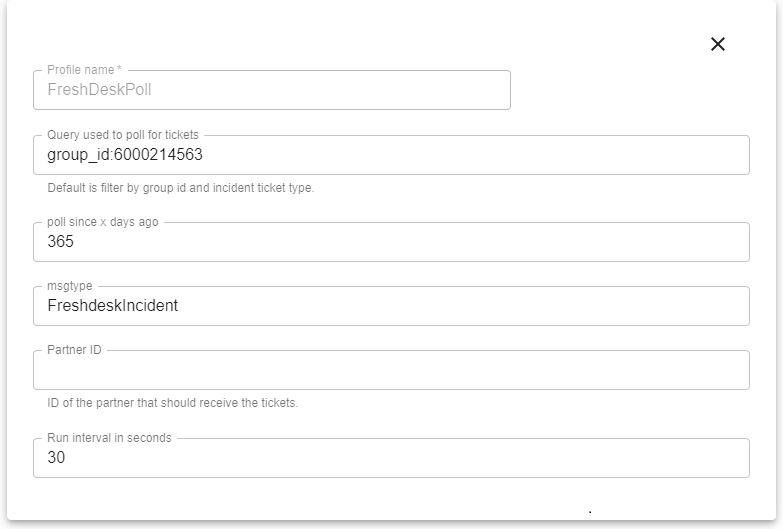
| Field | Supported Values | Description |
|---|---|---|
| Query used to poll tickets | Product filter language | Query used for polling (e.g., by group, ticket type) |
| Poll since X days ago | Integer | For first cycle, fetch messages newer than this value |
| msgtype | Any string | Type of message to retrieve |
| Partner ID | Integer | ID of the partner (used in 1Bonding scenarios) |
| Run interval in seconds | Integer | Polling interval in seconds (default: 300) |