Switch Plugin
The Switch plugin is used in the routing stage of a workflow to direct messages to different processing paths based on configurable conditions. For example, it can be used to differentiate between a new ticket that needs to be inserted into the destination system and an update to an existing ticket.
It uses filters to determine the next destination of a message in the workflow. It allows for dynamic message routing based on predefined conditions.
Key Features
- Filters: The switch plugin uses filters to decide where to send the message next.
- Endpoint Reference: Can reference an endpoint in the endpoint field to access the endpoint configuration.
- Profiles: Contains profiles with rule definitions to determine the next step in the workflow.
Use Cases
- Selective Message Routing: Route messages based on specific criteria.
- Prioritization: Route messages based on predefined conditions or priorities.
Example Workflow
- Insert: If the ticket has no ID and the message is not a feedback message, route to the “PrepareInsert ticket ServiceNow” plugin.
- Update: If the ticket has an ID and the message is not a feedback message, route to the “PrepareUpdate ticket ServiceNow” plugin.
- Feedback: If the ticket is a feedback message, route to the “ProcessFeedback ticket ServiceNow” plugin.
Configuration
Next Hop
Each rule profile in the Switch Plugin defines a next hop, which determines where the message is sent after it matches the rule.
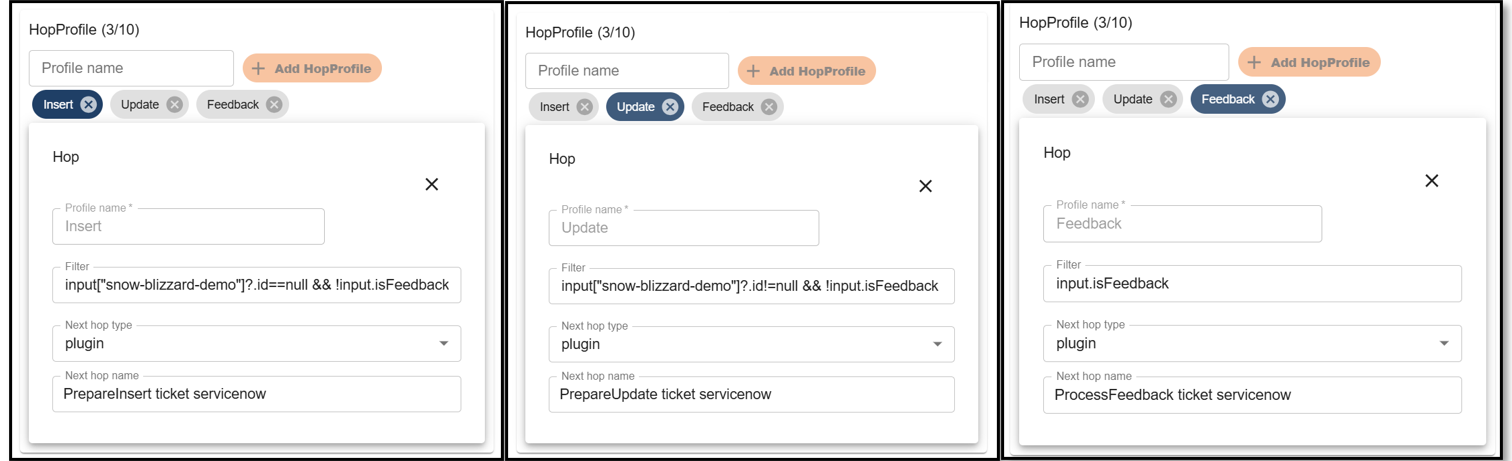
- Next Hop: Specifies the name of the next component (usually another plugin) the message should be routed to.
- Next Hop Type: Indicates the type of the next component (commonly
"plugin"). - Next Hop Name: The specific identifier of the component the message is forwarded to after evaluation.
Filter
The Switch Plugin uses Groovy expressions to evaluate conditions and determine which route a message should follow.
Each filter expression must return either true or false.
The following variables are available within the filter context:
| Variable | Description |
|---|---|
message | The current message object |
input | The message represented as a map |
api | The current plugin API object |
substitution | Allows access to substitution-based lookups |
Available Filter Context Objects
input
Provides direct access to message fields as a map.
Example:
input["endpoint"]?.id != null
message
Provides access to the message object using object notation.
Example:
message.endpoint?.id == null
substitution
Allows use of the standard substitution syntax within Groovy filters.
Example:
substitution.substitute("msg:endpoint.id") == "1"
Filter Examples
Check if a field exists
input["endpoint"]?.id != null
Routes the message only if the endpoint.id field exists.
Check if a field is missing
input["endpoint"]?.id == null
Routes the message only if the endpoint.id field does not exist.
Using the message object
message.endpoint?.id == null
Checks whether the endpoint.id field is missing using object notation.
Using substitutions
substitution.substitute("msg:endpoint.id") == "1"
Evaluates the message field using the substitution engine and compares the result.
Notes
- Filters are executed as Groovy expressions.
- Safe navigation (
?.) is recommended to avoid null pointer errors. - Any valid Groovy boolean expression can be used.