Dynatrace
Sender Description
The Dynatrace Sender Plugin sends test result data from 1Gateway into Dynatrace using the Dynatrace Synthetic Monitor API.
Messages from 1Gateway are mapped via a configured mapper (for example, automai2dynatrace) into a format understood by Dynatrace’s Synthetic API. The plugin sanitizes and orders the payload, then performs an authenticated REST POST to the configured Dynatrace endpoint.
In addition to sending results, the plugin:
- Validates message timestamps against future/past thresholds.
- Retries submissions when Dynatrace reports timestamps too far in the future.
- Supports multi-tenant or environment-specific endpoint configurations.
Prerequisites
Before configuring this plugin, ensure the following:
- You have access to the Dynatrace environment you intend to send data to.
- A valid Dynatrace API token with permissions to ingest Synthetic Monitor data.
- The Dynatrace endpoint URL for posting Synthetic test results.
- Appropriate message mapping configured in 1Gateway that conforms to Dynatrace payload format.
Example JSON Sent to Dynatrace
Below is an abstract example of the JSON that might be sent to Dynatrace. Your actual payload structure will vary by mapper and message content.
{
  "tests": [
    {
      "id": "1",
      "name": "Sample Test",
      "steps": [
        {"id":"1", "name":"Step1"},
        {"id":"2", "name":"Step2"}
      ]
    }
  ],
  "testResults": [
    {
      "id":"1",
      "locationResults": [
        {
          "stepResults": [
            {
              "id":"1",
              "responseTimeMillis": 120
            },
            {
              "id":"2",
              "responseTimeMillis": 150
            }
          ]
        }
      ]
    }
  ]
}
Sender Configuration
The Dynatrace Sender Plugin uses configuration profiles to control how and where messages are sent. There are two types of configurations typically involved:
Main Profile
| Field | Supported Values | Description |
|---|---|---|
| Dynatrace server | Hostname or IP | Dynatrace server hostname or URL. |
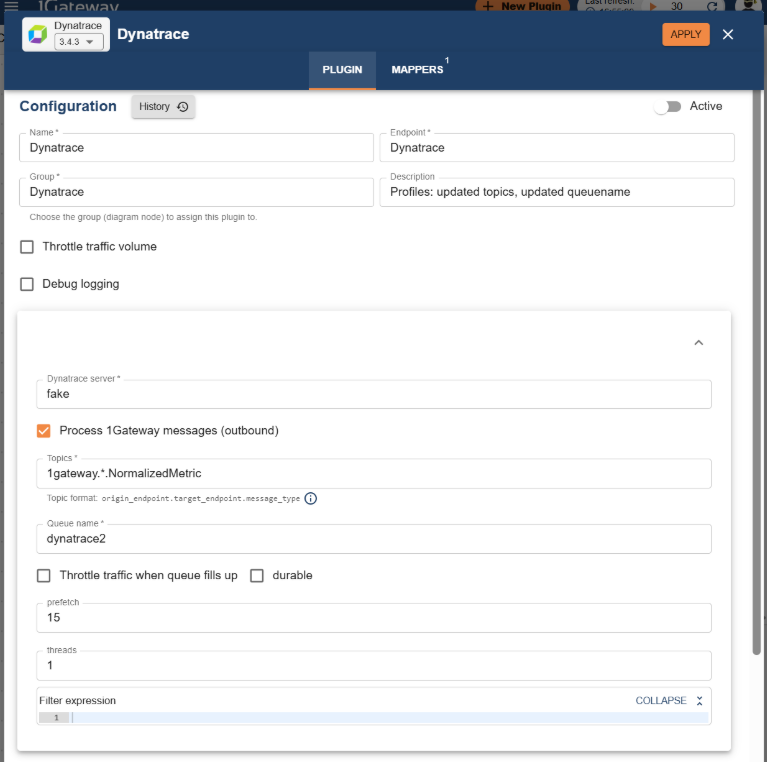
Setting server to "fake" activates a dry-run mode where outbound HTTP is skipped.
Environment Profiles
Dynatrace sender supports environment-specific endpoints. An environment profile configures how messages should be routed and authenticated for a specific target.
| Field | Supported Values | Description |
|---|---|---|
| name | String | Environment identifier used in messages. |
| Environment key or URL | Full URL | Complete REST endpoint including path and query (for Synthetic API). |
| API Key | String | API token header for the environment. |
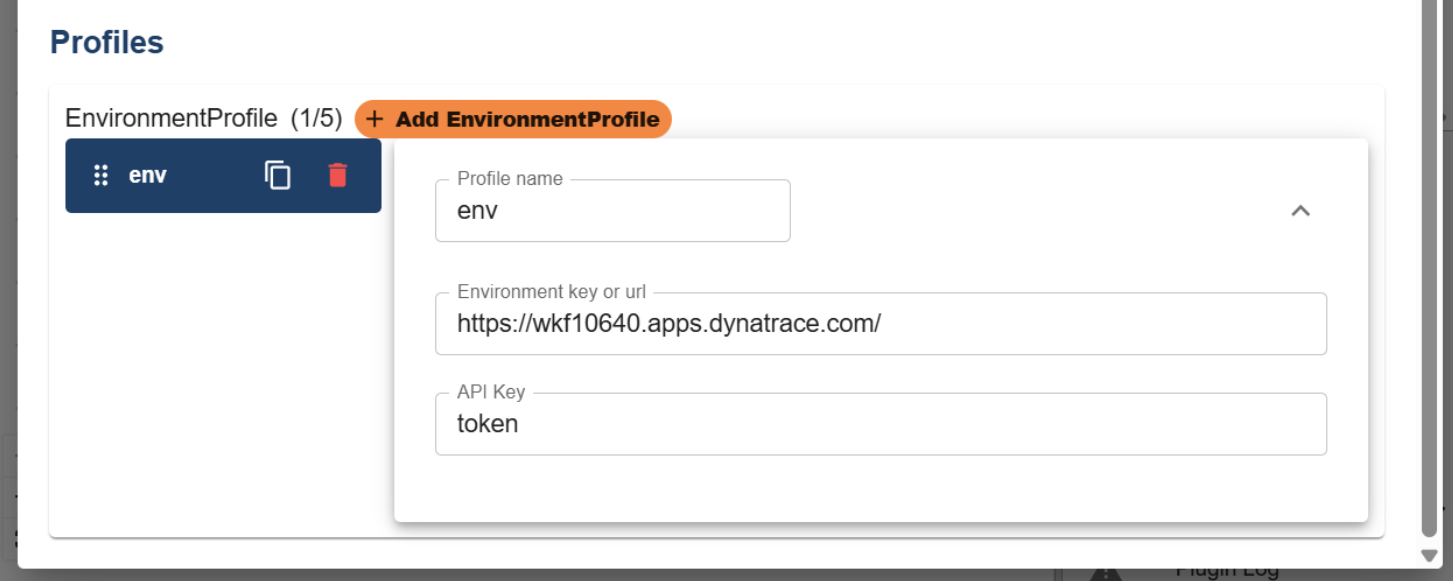
Usage: Messages are expected to contain an environment property. The plugin will lookup the matching environment profile. If missing or misconfigured, a default environment profile is used if available.
Message Validation
The plugin performs a timestamp check on incoming messages:
- Messages with missing or invalid timestamps are rejected.
- Messages older than ~2 hours may be dropped to prevent stale data.
- If Dynatrace reports the timestamp is too far in the future, retries are attempted.
Runtime Behavior
When a message is sent:
- The plugin validates the message timestamp.
- It resolves the appropriate environment profile based on message content.
- It serializes the message to JSON and sanitizes fields:
- Steps in tests are sorted
- Response time values are converted to integers
- It POSTs the JSON via HTTP to the Dynatrace endpoint.
- If HTTP errors occur (e.g., future timestamp), it may retry or raise an error.
Debugging
When debug is enabled in the main profile:
- Detailed logs of the selected environment profile, endpoint, and outgoing JSON are written.
- HTTP response bodies and status codes may also be logged for inspection.