Get Started with Groovy
Groovy plugins allow you to extend 1Gateway with custom logic when standard plugins are not sufficient. They are most used to integrate external systems, retrieve data on a schedule, or process messages in a custom way.
This guide walks through a simple but complete example:
- A Groovy poller that retrieves weather data from a REST API
- A Groovy sender that forwards the retrieved data to an external endpoint
Together, these demonstrate how data can flow into and out of 1Gateway using Groovy.
Download the sample configuration files to follow along with this guide: groovy_start.zip. To use these files, upload the ZIP file to your 1Gateway instance. Follow the instructions found in the Installation Files Guide.
Step 1: Creating a Groovy Poller
The Groovy poller runs on a configured interval. It retrieves data from an external system and publishes it into 1Gateway as messages.
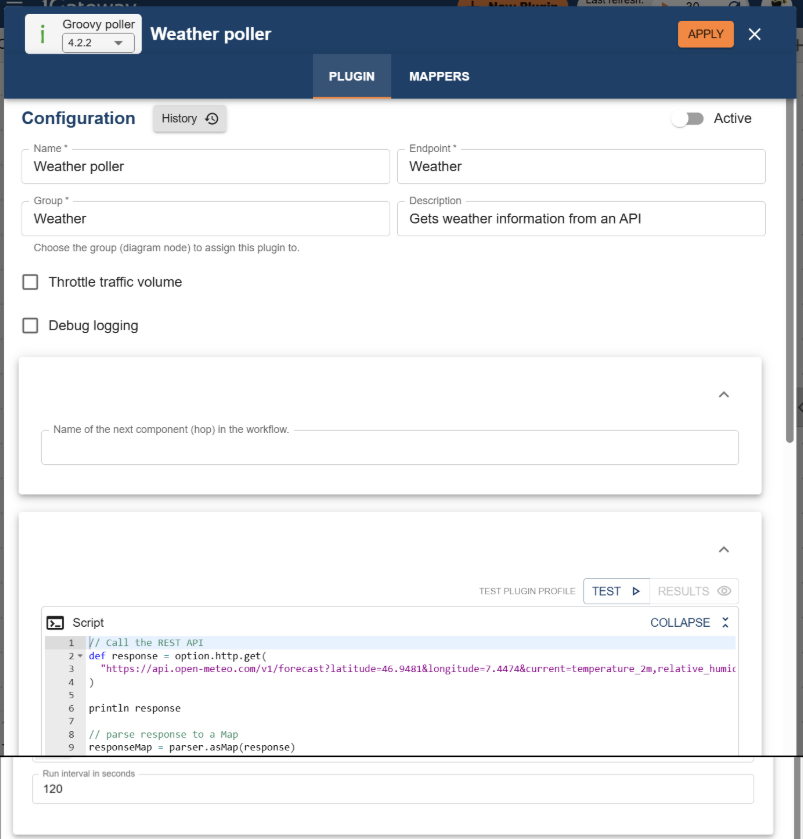
Groovy SDK objects
-
HTTP object: Used to perform REST calls.
-
Parser object: Used to work with structured data.
-
API object: Used to publish data back into 1Gateway.
Groovy poller script
The Groovy poller contains a script that:
- Calls a public weather REST API
- Parses the JSON response
- Extracts relevant values (temperature, humidity, etc.)
- Publishes those values as metrics
// Call the REST API
def response = option.http.get(
"https://api.open-meteo.com/v1/forecast?latitude=46.9481&longitude=7.4474¤t=temperature_2m,relative_humidity_2m,rain,weather_code"
)
println response
// parse response to a Map
responseMap = parser.asMap(response)
// Extract the "current" section from the response
current = responseMap.current
// Use location as CI identifier
def ci = "bern"
def cielement = "CH"
// Publish temperature metric
api.sendMetric(
ci,
cielement,
"weather",
"temperature",
current.temperature_2m
)
// Publish humidity metric
api.sendMetric(
ci,
cielement,
"weather",
"humidity",
current.relative_humidity_2m
)
return null
What the poller does
At each execution interval:
- The script calls the weather API for a fixed location
- The API returns the current weather conditions
- Each weather measurement is published as a separate metric
The poller does not route or filter messages—its sole responsibility is to produce data. The poller publishes data using the 1Gateway API.
Each metric includes:
- A CI (the entity being measured, e.g. a location)
- An element (what is being measured)
- An element type (logical grouping)
- A metric type
- A numeric value
Once published, the data is transformed into messages in 1Gateway.
Step 2: Creating a Groovy Sender
The Groovy sender receives messages from its queue. For each message it receives, it runs a Groovy Script that can forward data to external systems. Filters can be used to decide which messages the sender should process.
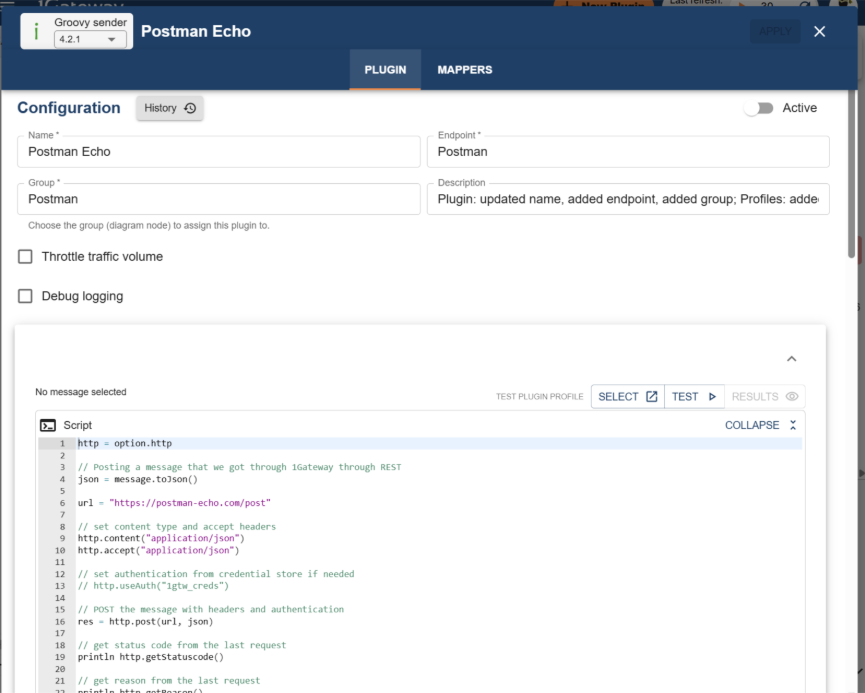
Groovy SDK objects
- Message object: Represents the message being processed.
- HTTP object: Used to send the message to an external system.
Groovy sender script
The Groovy sender:
- Receives messages from a queue
- Extracts message content
- Sends the data to an external HTTP endpoint (Postman Echo)
http = option.http

// Posting a message that we got through 1Gateway through REST
json = message.toJson()

url = "https://postman-echo.com/post"

// set content type and accept headers
http.content("application/json")
http.accept("application/json")

// set authentication from credential store if needed
// http.useAuth("1gtw_creds")

// POST the message with headers and authentication
res = http.post(url, json)

// get status code from the last request
println http.getStatuscode()

// get reason from the last request
println http.getReason()

// get response headers from the last request in a map
println http.getResponseHeaders()

// to retrieve one of the response headers, call get with the name of the header
http.getResponseHeaders().get("Content-Type")

println res
What the Sender Does
For each incoming message:
- The sender builds an HTTP request
- The message content is included in the request body
- The request is sent to the external endpoint
- The message is considered processed once the call completes
Step 3: Connecting Poller and Sender
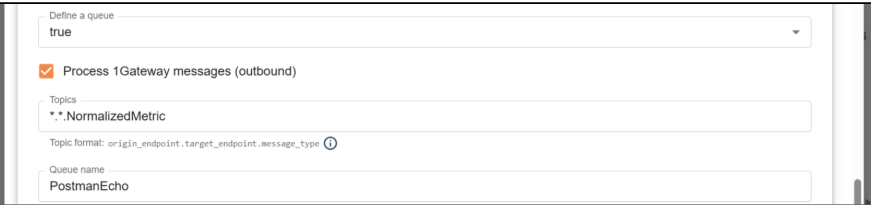
Pollers and senders are connected through queues defined in the sender plugin (asynchronous) or through the next hop field defined in the poller (synchronous).
In this example, the sender configures a queue that defines the messages it subscribes to. Format: Source.Destination.MessageType
This queue configuration should always be the primary routing mechanism.
Groovy filters should only be used when:
- Routing depends on message content
- Queue bindings alone are not sufficient
Execution Flow Summary
- Groovy poller runs on a schedule
- External API is called
- Data is parsed and published as a message
- Message enters the queue
- Groovy sender receives the message
- Data is sent to an external system
At no point is data silently discarded— messages either:
- Get processed
- Or continue unchanged through the system
When to Use a Groovy Plugin
Use a Groovy plugin when:
- You need logic not covered by existing plugins
- You need more control over message handling
- You want to integrate non-standard systems
Avoid Groovy when:
- A standard plugin already solves the problem
- The logic can be expressed with REST mappings